AgenticOps — The Agent Proxy
A field whitepaper on the second half of executable enterprise architecture: a multi-tenant agent proxy that gives every business user a direct line — natural-language commands over Telegram, WhatsApp, and social chat, routed to a dedicated LangGraph CEO pipeline, popping back to the human only when it cannot decide. Live on two clients: email-server replacement and YouTube channel management.
EYwALINK · 8 Oct 2026 · ~15 min read · v1.0
In this paper
1. Executive Summary
Executable enterprise architecture solved the first half. It turns a business idea into a strategy and delivers that strategy to binary — the target state, the build recipe, the working system. The second half is the part that decides whether value actually lands: can the business run its own day-to-day without opening a ticket to IT? A system that is right on day one still degrades: a mailbox that needs re-pointing, a channel whose cadence has drifted, a rule that stopped matching the real data. If day-to-day work goes through the IT ticket queue, the strategy-to-binary win decays at the speed of that queue.
The answer in this whitepaper: the business user does not go through IT at all. They have a direct line. One proxy agent per user, reachable over the chat channels they already use, fronts a per-tenant LangGraph pipeline that triages, decomposes, delegates, monitors, collects, merges, tests, and returns — and pops back to the user only at the moments it genuinely cannot decide. Two clients already run their steady-state work this way, with no IT team in the loop: an email-server replacement and YouTube channel management.
2. The Gap Strategy-to-Binary Left Open
Executable enterprise architecture removed the biggest friction between a strategy and a running system. The target state is now generated, validated, and dispatched as an executable build recipe, not a slide deck. That resolves the idea-to-value problem. It does not resolve the steady-state problem.
| Layer | What executable EA solved | What it did not solve |
|---|---|---|
| Strategy to binary | The target state, generated and dispatched as an executable build recipe | The day-to-day that keeps the system running |
| Who runs BAU | IT / an agent programme | The business user, directly |
The through-line: the steady state is where the value either holds or leaks. The question an organisation quietly asks is: when day-to-day work comes up, does the person who owns that work have to go through IT? The agent proxy is the architecture that answers no.
3. The Agent Proxy: Three Layers
The design has three layers, and the first one is deliberately boring: the interface is the chat box the user already lives in.
Channels — the chat box the user already lives in
A business user reaches the system over Telegram, WhatsApp, or a social chat surface. No portal to learn, no console, no IT ticket. The command is plain language: “re-point the mailboxes for the finance team,” or “make the Tuesday upload on the main channel consistent with last month.” The interface is deliberately boring: the first layer adds nothing to learn.
A proxy agent per user
Each business user has a dedicated proxy agent that is their standing interface. It speaks their vocabulary, holds their context, and is the only face of the system they ever need. It is not a shared assistant routed to the least-loaded instance; the user’s context, their history, and their autonomy tier live on their agent.
A multi-tenant control plane
The proxy hands the command to a multi-tenant control plane — the same issues/heartbeats/budgets/org-tree substrate that runs agent companies. The plane routes the request to the right tenant and to that tenant’s dedicated agent, with isolation enforced at the identity layer, not just the application layer. Every tenant gets a dedicated agent — its own CEO — not a shared one: a planner that holds global intent and routes to specialised workers, one per tenant. The proxy is the user’s front door; the tenant CEO is the engine behind it.
Every tenant gets a dedicated agent — its own CEO — not a shared one. A planner that holds global intent and routes to specialised workers, one per tenant, is the canonical multi-agent-orchestration pattern. The proxy is the user’s front door; the tenant CEO is the engine behind it.
4. The Pipeline Inside a Tenant
Each tenant’s CEO agent runs a pipeline built on LangGraph — a graph-based state machine where nodes are steps that mutate shared state and edges route control. It is not a chatbot that answers; it is a state machine that does, and the steps are the same for every request:
Read the command; establish what is being asked and what is in scope.
Break it into subtasks. Planning and decomposition are the load-bearing moves: the planner breaks the goal into subtasks and hands each to a specialist — the textbook hierarchical multi-agent pattern.
Fan out each subtask to the right worker agent (DevOps, Content, Configuration, or Other). The subtask is not a chat reply; it is a change that a worker executes and verifies in the right environment.
Track each subtask as it runs — status, budget crossings, tool outcomes.
Gather the outcomes of the subtasks back to the CEO.
Merge the subtasks’ worktrees into one result.
Verify the merged result before it is returned.
Hand the result back to the proxy, and through it to the user.
4.1 · The pop-back: where the human stands
The pipeline has a decision point at each step that cannot be resolved from context. When the CEO agent cannot decide — a scope boundary, an irreversible action, a missing parameter — it pops back to the proxy agent, and the proxy asks the user one specific question. The user answers in the same chat box they started in; the pipeline resumes. That pop-back is not a failure mode; it is the designed place where a human stands. This is graduated autonomy in practice: a fixed autonomy tier, with structured human-oversight points placed only at consequential or irreversible decisions, so the agent runs the BAU tier and hands off exactly the moments it should.
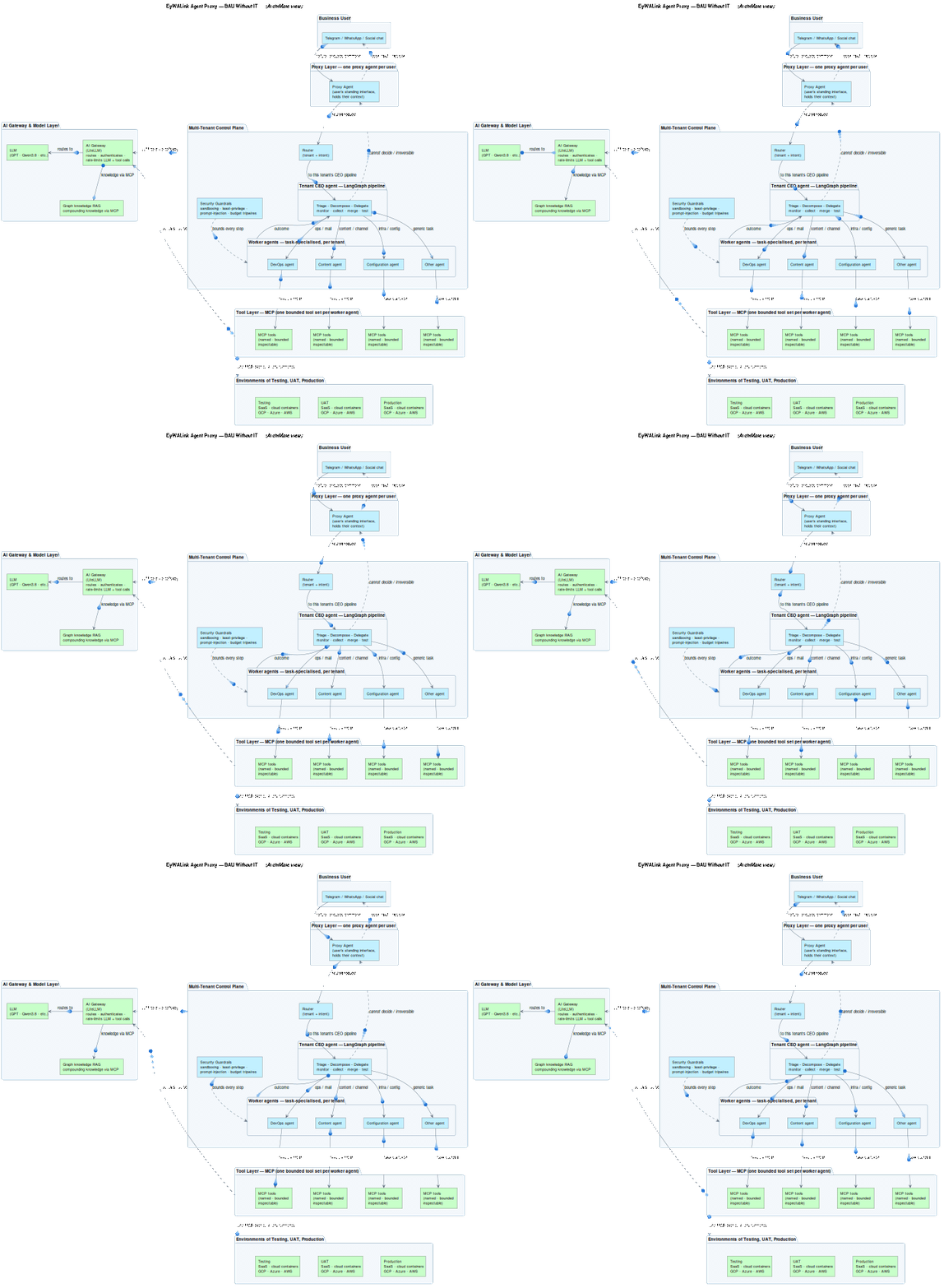
The AgentOPS platform, end to end. The dashed line is the pop-back: the moment the CEO cannot decide, control returns to the user, not to a log file.
5. Where the Human Actually Stands
The pop-back is the same tripwire discipline written for supervised autonomy, applied to a multi-tenant system. Two things make it safe enough to put a real system in front of a business user:
Irreversible verbs are gated by construction
Publish, send, re-point, drop. Everything reversible runs; everything that cannot be cheaply undone stops at the line and pops back to the user for a decision. The tripwire discipline of supervised autonomy, applied to a multi-tenant system: a fixed autonomy tier, with human-oversight points placed only at consequential or irreversible decisions.
MCP is the tool layer
Worker agents reach mail, channels, and data through the Model Context Protocol — a standardised, inspectable tool contract that decouples agents from specific integrations. No agent hand-rolls credentials against a live system; every capability is a named, bounded tool. That is also what makes the stack vendor-neutral: the model and the tools swap without the pipeline changing.
Guardrails are the perimeter
Per-tenant sandboxing, least-privilege tool grants, prompt-injection defence, and budget tripwires that auto-pause a tenant’s work when it crosses a spend threshold. The control plane enforces all of it, because the guardrail is a property of the substrate, not a promise the model is asked to keep. Alongside the tool layer, the plane reaches a graph knowledge store (GraphRAG) — entities as nodes, relationships as edges, so the pipeline does global sensemaking over the tenant’s own ontology, and the store compounds with every executed task.
The human-in-the-loop, precisely: not a reviewer who reads diffs — a user poked with one specific question at one specific moment, in the chat box they already own. That is the difference between an agent that reports and an agent that works for the person.
6. Two Clients, Run Directly by the Business
This is not a demo. Two clients ran their own steady-state work through the proxy, without an IT team in the loop:
Client A
Email-server replacementGave the instruction to move mail to the new server in natural language.
Triage, decompose the mailbox moves, run each in the environments (verify the cutover in test, validate in UAT, apply in production), collect outcomes, merge, test, return confirmation.
Popped back when a scope boundary needed a call; the user answered one question in the same chat.
Client B
YouTube channel managementSet the content and cadence requirements in natural language.
Decomposed into per-channel publishing tasks, ran each in the environments (preview, validate, publish), collected outcomes, merged, tested, returned a summary.
Escalated only where a decision was not derivable from context.
It is not the two use cases. It is that the requester is the business user, not an IT ticket queue. The strategy that executable EA delivered is now maintained by the people who own the outcome, in plain language, on the channels they already use — agents as first-class workers in day-2 operations, with the business user as the accountable owner of the outcome.
7. What Is Not Done Yet
Honest state of the art:
Defect self-diagnosis for reporting
When a subtask fails or a result is wrong, the pipeline can detect and contain it, but it cannot yet diagnose the defect and explain it back as a report the user can act on. The “why did this break, and here is the fix” is still largely on the human side of the pop-back.
Self-troubleshooting
Following from the above: the system can stop at the line, but it cannot yet reliably clear the line itself for a class of recurring faults. That is the next layer — a self-troubleshooting loop that turns the pop-back from “a human decides” into “the agent proposes a fix and the human approves.” Both are extensions of the same control plane, not new systems: the substrate already tracks every subtask, every outcome, and every budget crossing; the missing piece is the reasoning that turns that record into a diagnosis.
Both are extensions of the same control plane, not new systems. The substrate already tracks every subtask, every outcome, and every budget crossing; the missing piece is the reasoning that turns that record into a diagnosis.
8. The Industry Point: Zero Lock-in
The reason this matters beyond one company’s mailbox is the lock-in question. The pipeline is open-source and model-agnostic: LangGraph on the orchestration, MCP on the tools, a control plane you own. A business user’s natural-language command is not hostage to a vendor’s console, and the tenant’s data and ontology stay in the tenant’s hands.
Executable EA turns the strategy into a system; the agent proxy turns the system into something the business can keep running itself. The proxy is the layer that makes your steady state run on your substrate — the same zero-lock-in position the rest of the stack is built on, extended from the system down to the person.
9. Design Principles: What This Means for Builders
- 1
The interface is the chat box the user already lives in. No portal, no console, no IT ticket — the first layer of the architecture adds nothing to learn.
- 2
One proxy per user, one CEO per tenant. Dedicated, not shared: context, history, and autonomy tier belong to the user, not to a pooled assistant.
- 3
A planner holds global intent; workers execute. Triage and decompose are the load-bearing moves — the subtask is a verified change, not a chat reply.
- 4
The pop-back is not a failure mode; it is the designed place where a human stands. One specific question, at one specific moment, in the chat box the user already owns.
- 5
Irreversible verbs are gated by construction. Everything reversible runs; publish, send, re-point, and drop stop at the line and ask.
- 6
Guardrails are a property of the substrate, not a promise the model keeps. Per-tenant sandboxing, least-privilege tools, prompt-injection defence, and budget tripwires are enforced by the control plane.
- 7
MCP is the tool layer. Every capability is a named, bounded tool — which is what makes the model and the integrations swappable without touching the pipeline.
- 8
The graph knowledge store compounds. Entities as nodes, relationships as edges: the pipeline does global sensemaking over the tenant’s ontology, and every executed task makes it better.
10. How EYwALINK Closes the Gap
EYwALINK’s four strategic pillars are a problem-first decomposition of exactly what this whitepaper describes. Each pillar corresponds to a section; the product portfolio closes the specific gaps the paper names.
| Pillar | White-paper anchor | What it adds |
|---|---|---|
| Pillar 1 · AI Strategy & Architecture | §2 the strategy-to-binary gap + §4 the per-tenant topology | Executable EA maps the TOGAF target state; the agent proxy is its operational counterpart — the target state kept running by the business, with the multi-tenant control plane as the standing orchestration layer. |
| Pillar 2 · AI Safety & Privacy | §5 gates + guardrails + budget tripwires | Air-gapped serving, tenant isolation at the identity layer, least-privilege MCP tool grants, prompt-injection defence — compliance-ready (APP, APRA, GDPR) from day one; no data leaves the client perimeter. |
| Pillar 3 · Rapid AI-Led Application Development | §4 the LangGraph pipeline + §6 the two live clients | The eight-step pipeline is the application layer: RAG over the tenant ontology, agent workflows on LangGraph, and the environments (test / UAT / production) that make the delivery agile-sprint-shaped and demo-able weekly. |
| Pillar 4 · AI Observability & Operations | §4 monitor/collect steps + §7 what is not done yet | Model-health tracking and regression detection ride on the same control-plane telemetry; SLA-backed incident response and monthly cost/utilisation reporting read the subtask and budget records the pipeline already writes. |
The product portfolio, mapped to the gaps
§4 monitor + collect, §7 the missing diagnosis layer — self-hosted on client infrastructure; the subtask/outcome/budget records that a diagnosis report would read are already written by the control plane.
§4 test step and §6 environment progression (verify in test, validate in UAT, apply in production) — the four-phase E2E pipeline is the gate before any merged result reaches the user.
§7 self-troubleshooting — the LangGraph self-improving loop that turns a popped-back defect into a proposed fix the human approves is a Loop Factory instance over the defect record.
§2 the gap this whitepaper closes — executable EA delivers the target state to binary; the agent proxy is the day-2 operating model that keeps it running, with the control plane as the shared substrate.
The orchestration reference stack (LangGraph + MCP + LangSmith) is a platform the client does not own. The operational discipline is the same either way — what changes when you own the infrastructure is that the tenant ontology, the tool grants, the guardrail records, and the budget telemetry are all client assets rather than platform dependencies. The zero-lock-in, private-AI position is not a compromise; it is the prerequisite for AI safety and privacy in a regulated environment, and the agent proxy extends it down to the person.
11. References
- · From One Agent to a Company of Agents — The control plane: issues, heartbeats, budgets, org trees.
- · Supervised Autonomy: Choosing Where the Human Sits — The tripwire and gate discipline the pop-back is built on.
- · Executable Enterprise Architecture — Agentic TOGAF ADM — The strategy-to-binary layer this whitepaper builds on.
- · The Model Context Protocol — The standardised tool contract the pipeline reaches through to the client’s own systems.
- · Large Language Model based Multi-Agents: A Survey of Progress and Challenges — Guo et al., IJCAI 2024 — hierarchical multi-agent orchestration: a planner routes to specialised workers.
- · Understanding the Planning of LLM Agents: A Survey — The observe–plan–act–update loop; planning and task decomposition as the load-bearing move.
- · From Local to Global: A GraphRAG Approach to Query-Focused Summarization — GraphRAG: global sensemaking over the tenant ontology instead of chunk-match.
- · What is LangGraph? — IBM Think — graph-based state machines: nodes mutate shared state, edges route control.
- · Introducing the Model Context Protocol — Anthropic — decoupled tool-use standardisation for agents.
- · A Unified Framework for Human–AI Collaboration — Five-level graduated autonomy; the boundary between “agent runs BAU” and “agent asks a human.”
- · Employing Control Planes in Agentic Environments — AWS prescriptive guidance — control-plane / data-plane separation for multi-tenant agent systems; plus the CSA Agentic Identity Governance Framework v1.
- · The Agentic Organization: A New Operating Model for AI — McKinsey — agents as first-class workers in day-2 operations, not copilots.
All numbers and quotes trace to the sources above.
The Agent Proxy Turns the System Into the Business
Executable EA built the system. The proxy is what keeps it running — on your substrate, through the channels your people already use, with the human standing exactly where it should.
Get started
Strategy to binary: TOGAF ADM + Open Agile Architecture made executable.
The governed LangGraph loop that the self-troubleshooting extension runs on.
We’ll wire one day-2 workflow through the proxy — channel, CEO pipeline, and pop-back gates.
Want a BAU workflow running through your own proxy? Contact us — we’ll scope the tenant, the CEO pipeline, and the pop-back gates.